The world of research is changing fast. AI tools are now a core part of how PhD students and researchers work. From writing and editing to analyzing and presenting, these tools save time, reduce stress, and improve quality.
But one question remains: Which tool should you use, and when?
In this post, I will walk you through 9 powerful AI tools for researchers. Each tool has a clear use case. If you know when to use them, you can save hours every week and make your research journey much smoother.
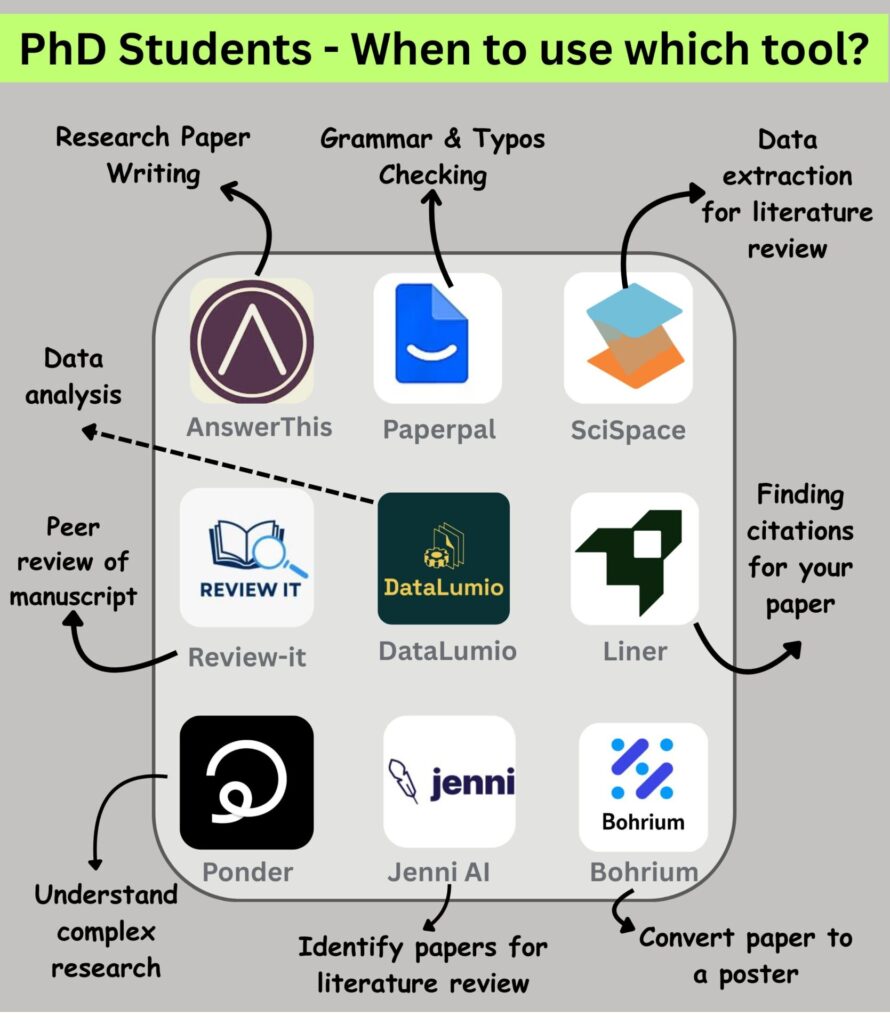
1. Writing Research Papers → AnswerThis
Link: https://answerthis.io/
Writing is the toughest part of a PhD. Sometimes you don’t know how to start. Sometimes you struggle with flow and structure.
AnswerThis helps here. It assists in generating drafts, polishing paragraphs, and even suggesting better academic phrases. You can paste your rough text and get improved writing instantly.
Use this tool when:
- You are starting a paper from scratch.
- You need help with formal academic style.
- You want suggestions to improve clarity.
2. Grammar and Typos Checking → Paperpal
Link: https://paperpal.com/
Even the best researchers make grammar mistakes. Journals reject papers if they find poor writing.
Paperpal acts like your personal proofreader. It checks grammar, spelling, and style. It also makes sure your sentences are concise and correct.
Use this tool when:
- You are editing your paper before submission.
- You want a professional-quality draft.
- You don’t have time for multiple proofreading rounds.
3. Data Extraction for Literature Review → SciSpace
Link: https://scispace.com/
Literature reviews are painful. You read dozens of papers and take notes, but often lose track.
SciSpace makes this easy. It extracts data, figures, and insights from research papers. You can quickly build summaries of what each study says.
Use this tool when:
- You are preparing your literature review chapter.
- You want quick comparisons between studies.
- You need structured notes without manual effort.
4. Peer Review of Manuscript → Review-it
Link: https://www.review-it.ai/
Before you send your paper to a journal, you need feedback. But supervisors are busy, and peers take time.
Review-it gives AI-powered peer review. It checks your arguments, flow, clarity, and even originality. It highlights weaknesses and suggests improvements.
Use this tool when:
- You want early feedback on your draft.
- You want to simulate a reviewer’s eye.
- You want to spot weak points before real reviewers do.
5. Research Data Analysis → DataLumio
Link: http://www.datalumio.co/
Data analysis is at the heart of most PhDs. But tools like SPSS, R, or Python can be hard to learn.
DataLumio helps you analyze your data with AI support. It can generate graphs, test models, and explain results in simple terms.
Use this tool when:
- You are analyzing quantitative or qualitative data.
- You want automated insights with explanations.
- You are preparing charts for your thesis.
6. Finding Citations for Your Paper → Liner
Link: https://getliner.com/
Citations are proof of your research depth. But finding the right ones takes time.
Liner finds relevant references for your paper. It highlights sources, extracts citations, and even integrates with your writing.
Use this tool when:
- You need to back up a claim with research.
- You want high-quality references.
- You are finalizing your bibliography.
7. Understand Complex Research → Ponder
Link: https://ponder.ing/
PhD life means reading complex papers. Sometimes, you don’t even understand half the words.
Ponder simplifies tough research papers. It explains them in plain English. It breaks down methods, findings, and arguments.
Use this tool when:
- You are struggling with a dense paper.
- You want quick explanations before diving deep.
- You want to save time on difficult readings.
8. Identify Papers for Literature Review → Jenni AI
Link: https://jenni.ai/
One of the hardest tasks is finding the right papers. You may search for hours and still miss key studies.
Jenni AI helps you identify relevant papers quickly. You can enter your topic, and it suggests high-quality studies to review.
Use this tool when:
- You are building your literature database.
- You want to avoid missing important work.
- You need quick scanning before writing..
9. Convert Paper to a Poster → Bohrium
Link: https://www.bohrium.com/
Posters are a common way to present research at conferences. But converting a long paper into a short, visual poster is tough.
Bohrium does this automatically. You can upload your paper, and it generates a conference-ready poster.
Use this tool when:
- You are preparing for a conference.
- You want to save design time.
- You want a professional look without learning design tools.
Why These Tools Matter
PhD life is not just about research ideas. It’s about managing time, improving quality, and reducing stress.
These AI tools help at every stage:
- Writing: AnswerThis, Paperpal
- Reviewing literature: SciSpace, Jenni AI
- Data analysis: DataLumio
- Improving quality: Review-it, Liner
- Presenting work: Bohrium
- Understanding research: Ponder
Each tool has a role. If you combine them smartly, you can focus more on thinking deeply and less on doing repetitive tasks.
Final Thoughts
Doing a PhD is hard. But AI tools can make it manageable. The key is not to use every tool randomly. The key is to know when to use which tool.
Start small. Pick one tool for writing, one for literature, and one for data analysis. See how much time you save. Once you are comfortable, expand to the others.
Remember: AI cannot do your PhD for you. But it can make your journey smoother, faster, and more enjoyable.
So, PhD students – the next time you feel stuck, don’t just struggle. Open the right tool. Let it help you. Then focus on what only you can do: thinking like a researcher.
Don’t forget to read: AI Tools for Literature Review
Best of Luck..