As a PhD student or researcher, you live in a world filled with tools.
From searching literature to analyzing data, every stage of research now has an AI companion waiting to help you.
But here’s the big question —
Should you go for free tools or invest in paid tools?
Let’s find out by comparing both across key stages of the research process.
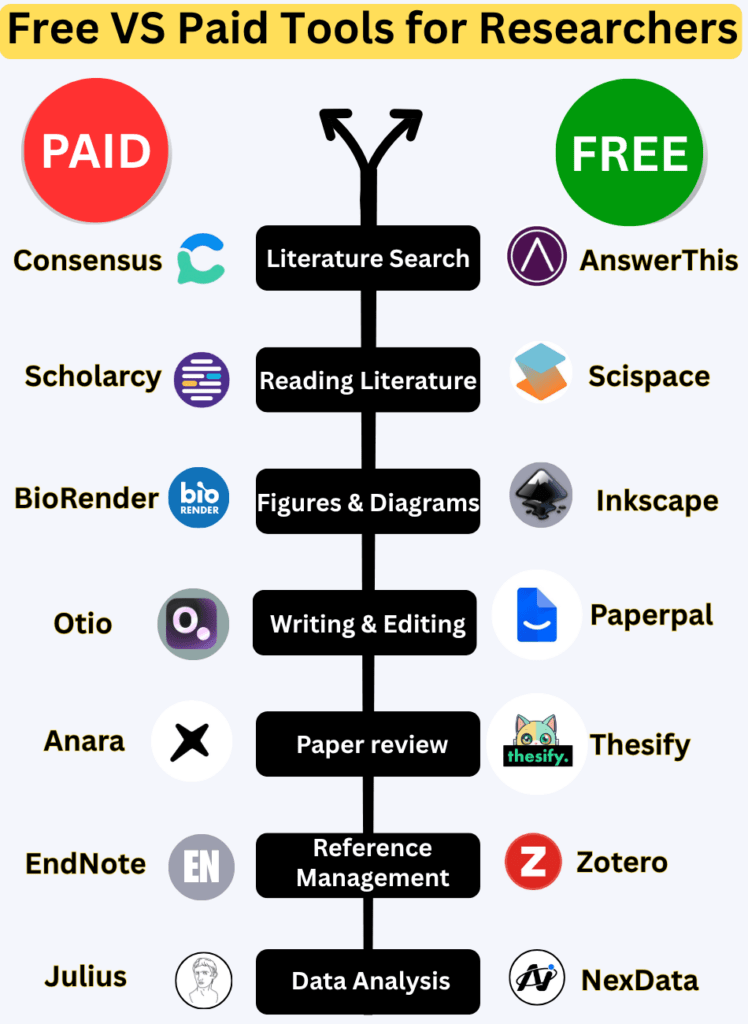
I’ve listed 7 major phases and the tools you can use in each.
Before we get to this week’s post, I want to share
I am running a FREE webinar on coming Friday, 14 November
Topic: How to write a research paper?
Registration Link: tinyurl.com/2mdckybw
Please register and learn how to write a research paper.
1. Literature Search
The first step of every research journey is finding the right papers.
- ✅ Free Tool: AnswerThis → Try it here
AnswerThis uses AI to help you find relevant research papers instantly.
You can ask natural questions like “What are the latest studies on AI in education?” and it summarizes answers from credible sources.
It’s fast, accurate, and perfect for early exploration. - ❌ Paid Tool: Consensus → Check it here
Consensus is an AI-powered search engine for scientific research.
It provides structured evidence-based answers — great for academic depth, but it comes at a cost.
Verdict:
If you’re just starting, AnswerThis gives you 80% of the value for free.
If you need deep systematic results, Consensus might be worth the investment.
2. Reading Literature
Once you find papers, the next task is understanding them — and this can be overwhelming.
- ✅ Free Tool: SciSpace → Visit SciSpace
This tool allows you to upload any research paper (PDF) and ask questions directly — like “What does Figure 2 mean?”
It simplifies jargon, explains methods, and summarizes complex paragraphs. - ❌ Paid Tool: Scholarcy → Visit Scholarcy
Scholarcy creates structured summaries, extracts data, and highlights key findings — great for managing large reading lists, but it’s subscription-based.
Verdict:
Use SciSpace if you’re looking for free interactive learning.
If you’re handling 100+ papers a month, Scholarcy can save you time — but only if you can afford it.
3. Figures & Diagrams
Visuals are powerful. Every good paper, presentation, or poster needs clear figures.
- ✅ Free Tool: Inkscape → Try it here
A professional open-source design tool for diagrams, flowcharts, and scientific visuals.
It may take some time to learn, but it’s completely free. - ❌ Paid Tool: BioRender → Explore BioRender
BioRender is built for researchers.
It offers thousands of ready-to-use scientific icons, especially for biology and medicine.
However, it comes with a hefty price tag.
Verdict:
If your research doesn’t demand discipline-specific visuals, Inkscape is more than enough.
But for life sciences researchers, BioRender is a time-saver and worth the cost.
4. Writing & Editing
Writing a paper can feel like climbing a mountain. Luckily, AI tools can help you polish your writing.
- ✅ Free Tool: Paperpal (Freemium) → Try it
Paperpal checks grammar, tone, and clarity specifically for academic writing.
It’s smarter than Grammarly when it comes to research papers.
The free version is generous, but advanced editing requires a paid plan. - ❌ Paid Tool: Otio → Explore Otio
Otio goes beyond grammar. It uses AI to suggest structure, improve coherence, and even check research flow.
Perfect for journal submissions, but not budget-friendly for students.
Verdict:
Start with Paperpal’s free version — it’s all you need for drafts.
Upgrade only when you need journal-level editing.
5. Paper Review
Before submission, you need a peer-review-like experience to find flaws.
- ✅ Free Tool: Thesify → Visit Thesify
Thesify uses AI to review your thesis or paper.
It checks structure, argument strength, and alignment with your objectives.
It’s a smart “AI peer reviewer” for researchers. - ❌ Paid Tool: Anara → Visit Anara
Anara is a professional-grade AI reviewer used by publishing houses.
It gives detailed feedback but comes with a subscription cost.
Verdict:
Thesify offers excellent free value and helps you improve your writing before submission.
If you are submitting to a high-impact journal, Anara can give you extra assurance.
6. Reference Management
No research is complete without proper citation management.
- ✅ Free Tool: Zotero → Use Zotero
Zotero helps you store, organize, and cite references automatically.
It integrates well with Word, Google Docs, and browsers.
Best part — it’s open source and forever free. - ❌ Paid Tool: EndNote → Visit EndNote
EndNote offers advanced collaboration, automatic style formatting, and cloud sync.
It’s great for large teams, but individual researchers can do fine without it.
Verdict:
Zotero is unbeatable for individual researchers.
If you’re in a lab managing dozens of shared references, EndNote may be worth considering.
7. Data Analysis
This is where your real research power lies — making sense of data.
- ✅ Free Tool: NexData → Try NexData
NexData offers free datasets for research across various domains.
Perfect for PhD students who need data but can’t collect their own. - ❌ Paid Tool: Julius AI → Visit Julius
Julius allows you to upload data and get instant visual analysis using AI.
It’s excellent for professionals but expensive for students.
Verdict:
If you are exploring or learning, NexData gives you quality datasets for free.
Once you start analyzing your own complex data, Julius can speed things up — if you have the budget.
The Bigger Picture: Free vs Paid Tools
Let’s be honest.
Most free tools today are powerful enough for 90% of your research needs.
They’re getting smarter, faster, and more accurate every day.
However, paid tools bring comfort, automation, and time savings.
They’re ideal when you’re publishing frequently or managing multiple projects.
Here’s a simple way to decide:
- If you’re a PhD student → Start free. Learn the process. Save money.
- If you’re a Postdoc or Professor → Consider paid tools to maximize productivity.
If you’re a Research Lab or Organization → Paid tools are an investment, not an expense.
Final thoughts
Choosing between free and paid tools is not about money — it’s about fit.
Ask yourself:
- What do I need this tool for?
- How often will I use it?
- Does it save me time or just look fancy?
Free tools give you control and flexibility.
Paid tools give you polish and precision.
The smart researcher knows when to use each.
Start with free tools. Master them. Then upgrade only when you feel the need.
Remember:
A tool is only as good as how you use it.
Don’t let technology replace your creativity — let it amplify it.
If you liked this post, share it with your lab mates.
Don’t forget to read: AI Tools for Literature Review
Best of Luck..