Do you need an all-in-one assistant for your research?
Try AnswerThis: www.answerthis.io
This tool will 10x your experience of conduting a literature review and writing research papers.
If you are a researcher or a PhD student, you already know this pain.
You download papers.
You save PDFs everywhere.
You forget where a citation came from.
You panic before submission.
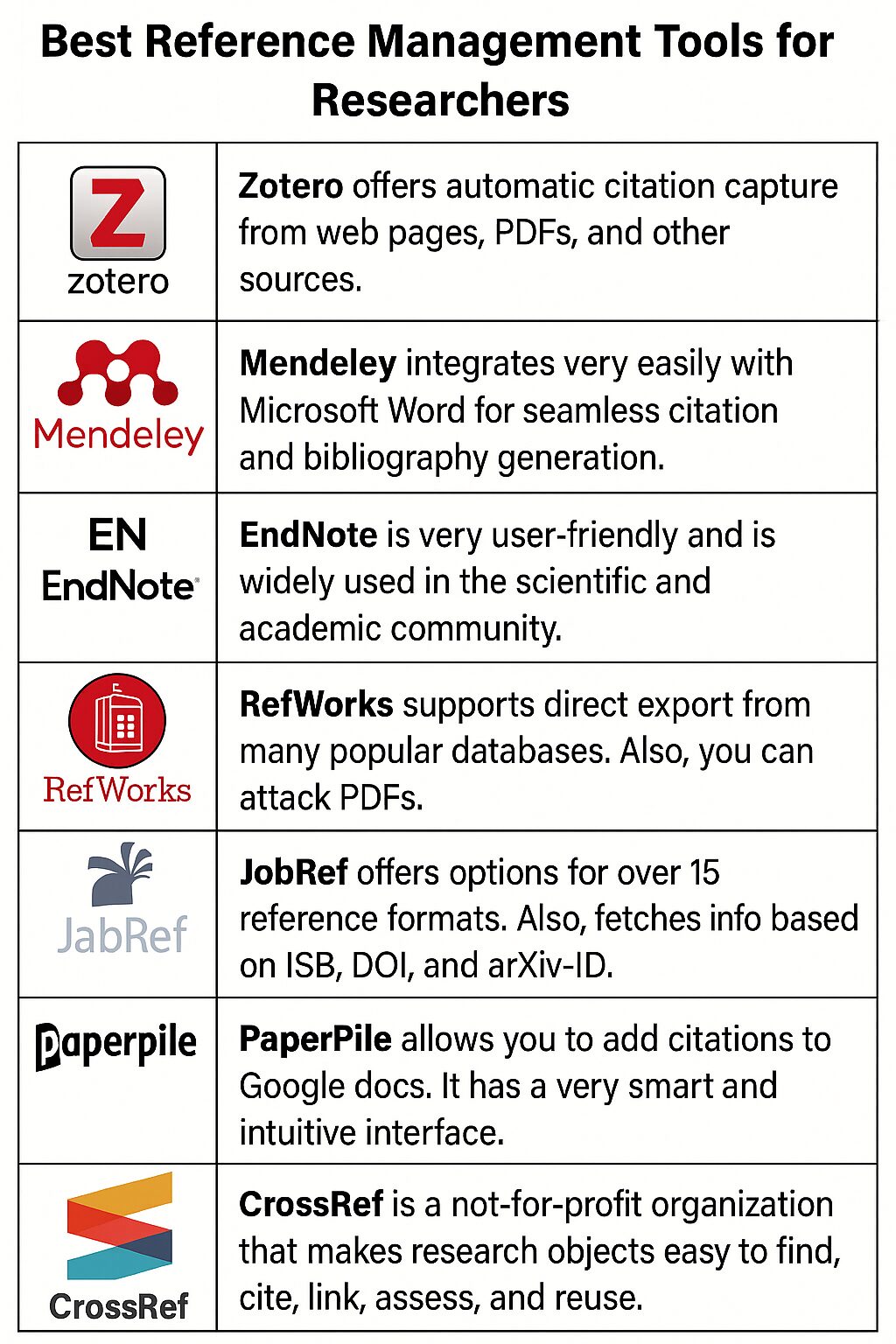
This is exactly why reference management tools exist.
They help you collect papers.
They help you organize references.
They help you cite correctly.
And they save you many hours.
In this guide, we will walk through the most popular reference management tools.
We will discuss their pros and cons.
And we will help you decide which tool is right for you.
Let’s begin.
Why Reference Management Tools Matter
Before tools like Zotero or Mendeley, researchers did everything manually.
That meant:
- Copying citations by hand
- Managing Word documents with broken references
- Losing track of sources
Today, this is unnecessary.
A good reference manager helps you:
- Store thousands of papers
- Generate citations automatically
- Switch citation styles easily
- Avoid plagiarism mistakes
If you write papers, theses, or grants, you need one.
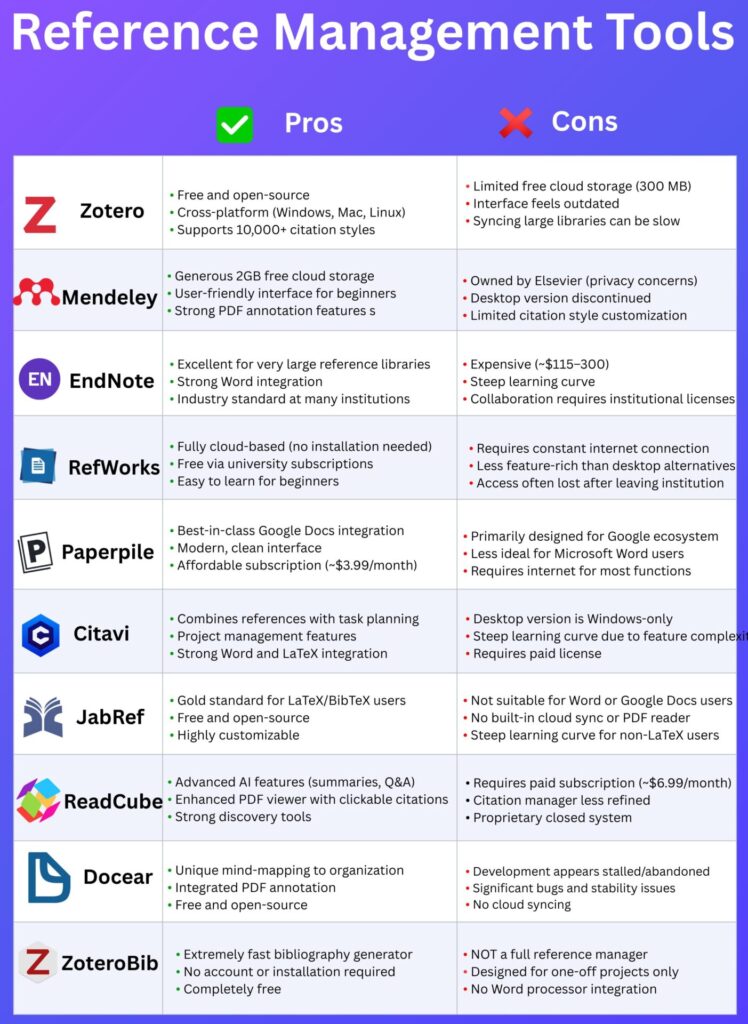
1. Zotero
Zotero is one of the most popular tools among academics.
Pros
- Free and open-source
- Works on Windows, Mac, and Linux
- Supports over 10,000 citation styles
Cons
- Free cloud storage is limited (300 MB)
- Interface feels a bit outdated
- Syncing large libraries can be slow
Best for
PhD students who want a free, powerful, and transparent tool.
If you care about open science, Zotero is a great choice.
2. Mendeley
Mendeley is widely used, especially by beginners.
Pros
- 2GB free cloud storage
- Easy to use
- Strong PDF annotation features
Cons
- Owned by Elsevier (privacy concerns)
- Desktop version discontinued
- Limited citation style customization
Best for
Early-stage researchers who want simplicity and PDF reading in one place.
If privacy matters to you, think twice.
3. EndNote
EndNote is a long-standing industry standard.
Pros
- Excellent for very large libraries
- Strong Microsoft Word integration
- Used by many universities
Cons
- Expensive ($115–$300)
- Steep learning curve
- Collaboration often needs institutional licenses
Best for
Senior researchers and labs with institutional support.
Not ideal for students paying from their own pocket.
Do you need an all-in-one tool for researchers?
Try SciSpace: www.scispace.com
It offers many FREE features ranging from literature review to paper writing.
4. RefWorks
RefWorks is a cloud-based reference manager.
Pros
- No installation needed
- Often free via university subscriptions
- Easy for beginners
Cons
- Requires constant internet
- Fewer features than desktop tools
- Access may end after graduation
Best for
Students who want a simple, university-provided solution.
But long-term access can be an issue.
5. Paperpile
Paperpile works best with Google Docs.
Pros
- Excellent Google Docs integration
- Clean and modern interface
- Affordable subscription (~$3.99/month)
Cons
- Designed mainly for Google ecosystem
- Less ideal for Microsoft Word users
- Needs internet for most features
Best for
Researchers who write entirely in Google Docs.
If you live in Word, this may not be for you.
6. Citavi
Citavi combines reference management with project planning.
Pros
- Task and knowledge management features
- Strong Word and LaTeX integration
- Good for structured research projects
Cons
- Windows-only desktop version
- Steep learning curve
- Requires paid license
Best for
Researchers who like detailed planning and structured workflows.
Powerful, but not beginner-friendly.
7. JabRef
JabRef is a favorite among LaTeX users.
Pros
- Gold standard for BibTeX users
- Free and open-source
- Highly customizable
Cons
- Not suitable for Word or Google Docs
- No built-in cloud sync
- Steep learning curve for non-LaTeX users
Best for
PhD students writing in LaTeX.
If you use Overleaf, JabRef fits perfectly.
8. ReadCube
ReadCube focuses on smart reading and discovery.
Pros
- AI features like summaries and Q&A
- Enhanced PDF viewer
- Strong paper discovery tools
Cons
- Requires paid subscription (~$6.99/month)
- Citation manager is less refined
- Closed, proprietary system
Best for
Researchers who want AI-assisted reading and discovery.
Less ideal if citation control is your priority.
9. Docear
Docear is a unique tool with mind-mapping features.
Pros
- Visual organization using mind maps
- Integrated PDF annotation
- Free and open-source
Cons
- Development seems stalled
- Stability issues
- No cloud syncing
Best for
Researchers who think visually.
But be cautious about long-term reliability.
10. ZoteroBib
ZoteroBib is different from Zotero.
Pros
- Extremely fast bibliography generator
- No account or installation needed
- Completely free
Cons
- Not a full reference manager
- Designed for one-off projects
- No Word integration
Best for
Quick citations for short assignments or blog posts.
Not suitable for thesis writing.
How to Choose the Right Tool
Ask yourself a few simple questions:
- Do I use Word or LaTeX?
- Do I want free or paid?
- Do I need cloud sync?
- Do I care about privacy?
- Do I work alone or in teams?
There is no “best” tool for everyone.
There is only the best tool for your workflow.
A Simple Recommendation
- Best free tool: Zotero
- Best for beginners: Mendeley
- Best for LaTeX users: JabRef
- Best for Google Docs: Paperpile
- Best with AI features: ReadCube
Pick one.
Learn it well.
And stick with it.
Final Thoughts
Reference management is not optional anymore.
It is a core research skill.
A good tool:
- Saves time
- Reduces stress
- Improves accuracy
- Makes writing easier
If you are serious about research, invest time in choosing the right reference manager.
Your future self will thank you.